
One payment. Editable files you keep. This toolkit is separate from the online rental workspace. Ask for help choosing.
Before you pay: toolkit purchases are non-refundable except where applicable law requires otherwise. Check the file list and device requirements. Read our Refund Policy, Terms of Use and Privacy Policy. Questions? Email NYUMBALEDGER.
Track rent, balances and tenant records in one editable pack.
For landlords who prefer Excel and Word: keep rent payments, expenses, receipts and move-in records together. Pay KSh 1,500 once; no monthly toolkit subscription.
Editable Excel and Word files. A computer is easier for detailed spreadsheets; phone use needs compatible apps.
This is what you are buying
The NyumbaLedger Landlord Starter Pack is a ready-to-use set of editable rental-record files for one landlord, one property or a small rental block. It helps you keep your own records; it is not a legal, accounting or property-management service.
You receive these exact six files in one ZIP download:
- Kenya-Landlord-Rental-Tracker.xlsx — tenant register, rent payments, expenses and dashboard.
- Tenant-Agreement-Template.docx — editable residential tenancy agreement.
- Rent-Receipt-Template.docx — printable payment receipt.
- Tenant-Move-In-Checklist.docx — condition and key handover record.
- Property-Inspection-Checklist.docx — condition, repairs and follow-up record.
- Landlord-Starter-Pack-Quick-Start.docx — simple guide to using every file.
You download one ZIP package immediately after confirmed payment. Keep checkout open for your download. A private link is also sent by email and is valid for 48 hours; contact support if it does not arrive.
Your download folder contains these 6 files
Record each payment, balance, receipt number and M-Pesa reference.
Use an agreement and move-in condition record before handover.
Record property repairs and expenses separately from rental income.
See the included landlord workbook
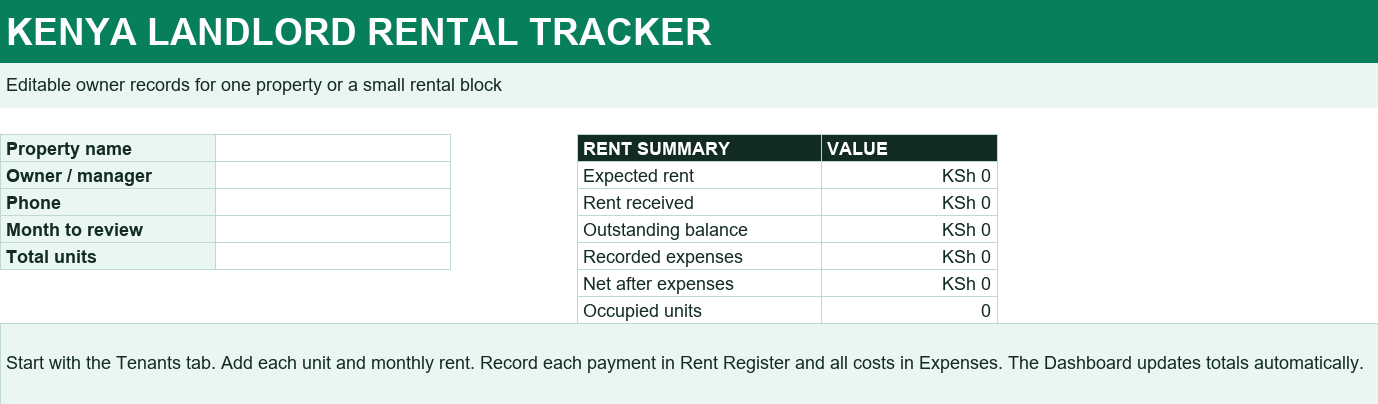
Preview of the included blank workbook. Enter your records to populate the summary.
The recordkeeping workflow
Illustrative example using fictional figures. This explains the workflow; it is not a screenshot of the workbook.
| Unit | Rent due | Paid | Balance |
|---|---|---|---|
| A-01 | KSh 15,000 | KSh 15,000 | KSh 0 |
| A-02 | KSh 12,000 | KSh 8,000 | KSh 4,000 |
- Add your tenant and rent details.
- Record the payment and its M-Pesa or bank reference.
- Review balances, issue a receipt and record expenses.
Is this the right choice for you?
Why buy files when the online workspace is free?
Choose this pack if you prefer to keep editable files on your own device and want printable forms. Choose the online workspace if you want connected rent records in a browser. They are separate products; you do not need to buy both.
Do I need Excel and Word?
You need compatible spreadsheet and document apps, plus a way to extract the ZIP. Confirm that your device can edit these formats before buying. The pack records the figures you enter; it does not collect rent automatically.
Get the Landlord Starter Pack today
Pay once by M-Pesa. After confirmed payment, your ZIP download appears on the checkout page. Download it straight away and keep the files safely; contact support if the email copy does not arrive.
Buy with M-PesaPersonal-use licence: one buyer may use the pack for their own rental properties. Do not resell or share the files publicly.
Buy with confidence: know what to expect
Buying a toolkit gives you files, not an online subscription. You need an app that opens Excel and Word files. On a phone, you will also need to extract the ZIP; a larger screen is easier for working with detailed spreadsheets.
- Choose the pack and check the exact file list.
- Enter an email you can access and the Safaricom number you will use.
- Check the amount on the M-Pesa prompt. Enter your PIN only in the M-Pesa prompt, never on this website or in a support chat.
- After payment confirms, download your ZIP from checkout. The private link is also emailed and remains available for 48 hours.
No payment prompt or confirmation?
Check the number and your phone connection. If you have already been charged, do not send another payment. Contact support with the product name, payment date and transaction reference so the payment can be checked.
Missing email, expired link or trouble opening files?
Check spam or junk first. Keep your transaction reference and contact support for help verifying the purchase and restoring download access. Do not share the private download link publicly.
Ask on WhatsApp Payment & download support Compare the three packs