
RENT MANAGER FOR WINDOWS · FOR LANDLORDS & AGENTS
Know who has paid.
Know what needs action.
A clear answer when a tenant asks about a balance, an owner asks for a report, or you need to know what is overdue. Connect rent records, receipts and property costs in your own Windows workspace.
✓ Local encrypted records✓ Cash, M-PESA & bank records✓ No monthly software renewal
KSh 4,999 once · Kenya
US$49 once · International users
Lifetime activation · one active Windows installation/profile
Download free from Microsoft Store. Paid activation unlocks changes to rental records.
FOLLOW THE CURSOR · 3:15 · GUIDED VOICEOVER + CAPTIONS
Video chapters and full transcript · 3:15
0:00 · Start with a clear rental record
This is the real Rent Manager app, using fictional sample records. Follow the highlighted cursor as we add a tenant, record a part payment, and check the results.
0:10 · Open a new tenancy
First, click Properties and tenants. Under Acacia Heights, click New tenancy. The vacant unit C zero five is ready for a new occupant.
0:19 · Enter the tenant’s name
Click Tenant name and type Demo Tenant Sam. This connects the occupant to the unit, so you can find the right record later.
0:27 · Give the tenancy its own reference
Next, enter the permanent reference A H one zero five, demo. A separate reference keeps this tenancy distinct from other occupants and their payments.
0:37 · Set monthly rent
Enter eight thousand shillings as the monthly rent. Keeping the agreed rent with the tenancy makes the record easier to review.
0:46 · Separate arrears from the deposit
Here, enter eight thousand shillings of opening rent arrears, then eight thousand as the deposit due. Rent debt and security deposits remain separate.
0:56 · Save and verify the tenant
Click Create tenancy. Sam now appears in C zero five, with eight thousand shillings due. Pause here to check the name, reference and balance.
1:06 · Open payment recording
Return to Overview and click Record payment. This opens the form for a cash, M-PESA or bank payment record.
1:13 · Select the receiving account and tenant
Choose the Acacia receiving account, then select Sam in C zero five. Matching the payment to the right tenancy keeps the money and its context together.
1:23 · Enter the received amount
Click the amount field and enter five thousand shillings. We are demonstrating a part payment against the eight thousand shilling opening rent debt.
1:33 · Keep a clear payment reference
Enter the receipt reference, then add a note marking this as a fictional demonstration. The date, amount, account and supporting note stay with the entry.
1:43 · Check and save the entry
Check the details, tick the confirmation box, and click Save received payment. The recorded ledger updates. This sample entry moves no real money.
1:53 · Open the saved receipt
Open the payment register, then click the new receipt. It shows Sam’s five thousand shilling payment and three thousand shillings remaining. The entry is labelled manual, not provider verified.
2:05 · Check the remaining arrears
Close the receipt and click Arrears and promises. Filter to Acacia Heights. Sam’s remaining three thousand shillings appear in the arrears list, ready for a focused follow-up.
2:17 · Review the next follow-up action
Click Promise beside Sam. This is where you record an agreed payment amount and date. A promise does not clear the debt. We cancel without saving one.
2:27 · Review the property report
Click Annual rent report. The Acacia report brings collections, expenses, agency fees and owner totals together. Scroll down to review the annual total. These are management records.
2:39 · Open the tenant statement
Click Statements, search for Sam, then open his statement. The opening rent debt and the part payment explain the remaining three thousand shillings. The deposit due stays separate.
2:51 · Keep records recoverable
Finally, open Backup and settings. Export encrypted backups to storage outside the computer and keep the password safe. This helps you recover your records if the computer is lost.
3:02 · Try it before buying
Rent Manager lifetime desktop activation costs four thousand nine hundred and ninety-nine shillings once. Try the real-interface website demo, then ask support about your rental requirements.
Watch a tenant record become a payment, receipt and clear balance.
Follow each click and typed entry as we add Sam, record a KSh 5,000 part payment, open the receipt and check KSh 3,000 remaining arrears. Step-by-step narration, highlighted cursor and reading pauses. Real app actions with fictional sample data.
See collections, outstanding rent and unmatched payments together.
Use local records without a constant internet connection after activation.
Export encrypted copies to storage you choose. Keep your password safe.
Kenya: KSh 4,999 once. International users: US$49 once. Plan your software cost without monthly renewals.
LESS GUESSWORK AT RENT TIME
Turn scattered payment messages into records you can follow.
Link each payment to a tenant and unit. Review balances, receipts and exceptions before following up or preparing an owner statement.
Prove it to yourself.
In the demo, record KSh 4,000 for Brian K. His rent becomes clear and total arrears fall from KSh 37,000 to KSh 33,000.
Fictional example, not a customer result or payment collection.
DON’T TAKE THE HEADLINE ON TRUST. FOLLOW THE RECORD.
One sample payment. Three places you can verify it.
Rent Manager is a strong choice when you need to explain a balance, rather than simply store a number. These screenshots come from the running app’s fictional sample workspace. The same KSh 4,000 payment appears in the portfolio totals, the tenant’s receipt and the annual report.
BEFORE THE SAMPLE ENTRY
KSh 4,000 due
Brian K. · Green Court A02. Portfolio outstanding: KSh 37,000.
ONE RECORDED CASH PAYMENT
KSh 4,000
Receipt DEMO-VIDEO-4000 is allocated to Brian’s tenancy reference GC102.
AFTER THE SAMPLE ENTRY
KSh 0 due
Brian’s rent is clear. Portfolio outstanding: KSh 33,000. Allocated collections: KSh 93,000.
This demonstrates the recorded ledger workflow, not money recovered from a customer. The entry is fictional and manually recorded; no payment provider was involved.
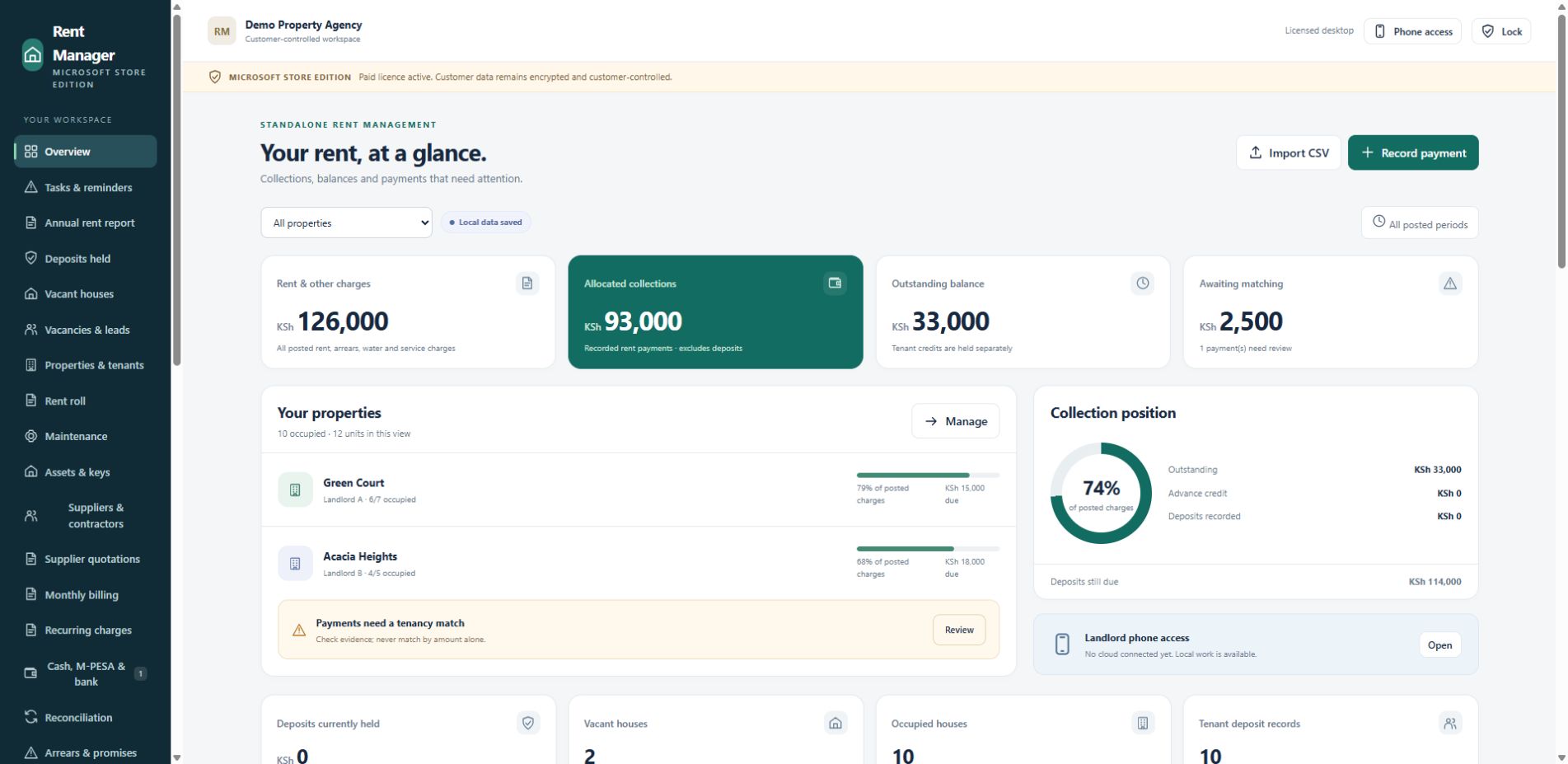
PROOF 1 · PORTFOLIO VIEW
Know where to put your attention.
The dashboard shows charges, allocated collections, outstanding balances and money awaiting a tenancy match separately.
Why that matters: you can distinguish rent that is still owed from a payment that needs review. An unclear reference does not have to become a guessed allocation.
Visible here: KSh 33,000 outstanding and KSh 2,500 awaiting matching are separate figures.
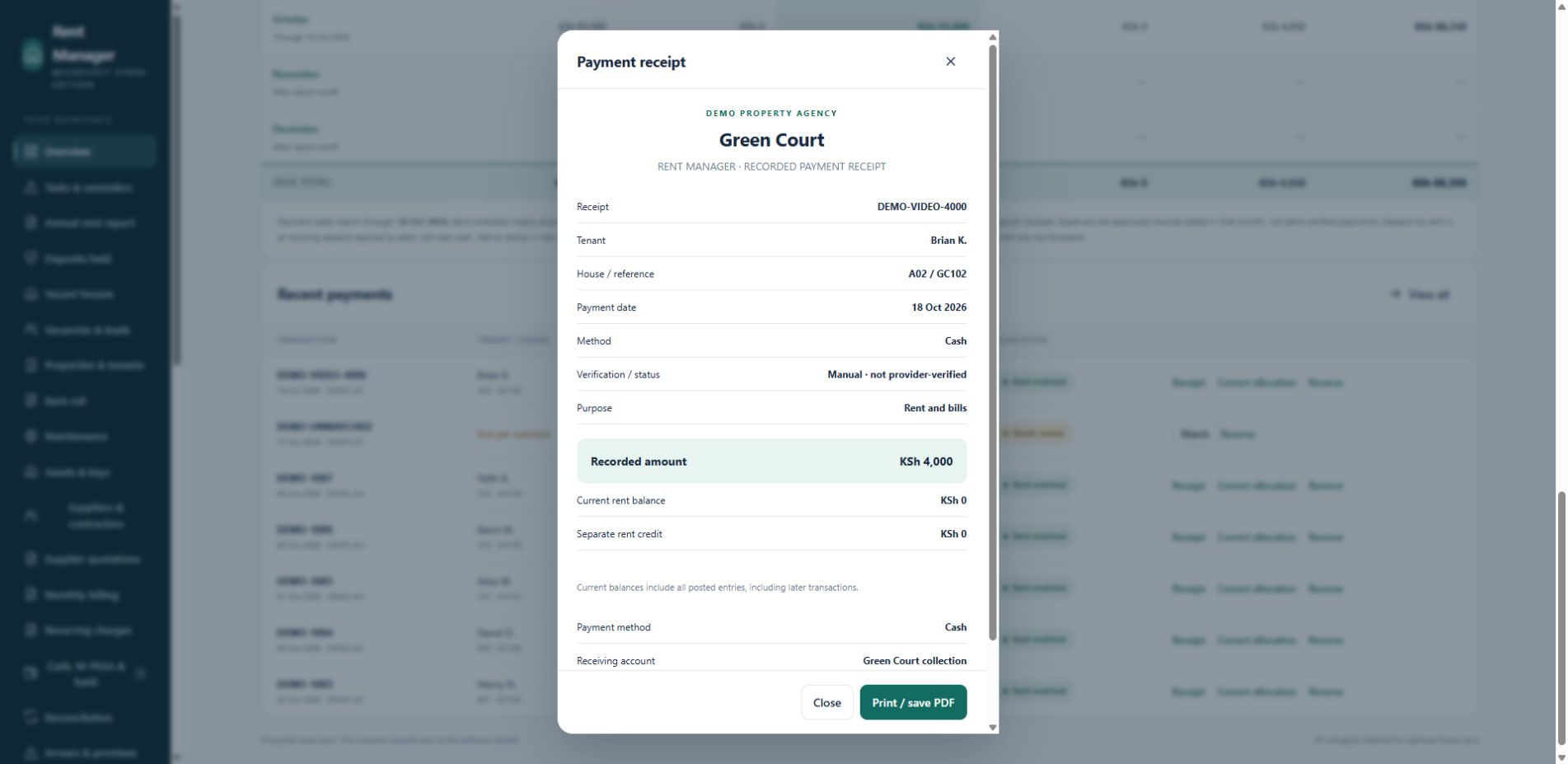
PROOF 2 · TENANT RECEIPT
Answer “What did I pay, and what is left?”
The receipt connects the reference, tenant, house, date, method and recorded amount. Brian’s current rent balance is shown as KSh 0.
Why that matters: you have a specific record to review with a tenant, instead of searching through unrelated messages or relying on memory.
The app labels this entry Manual · not provider-verified. It keeps your record distinct from bank or Safaricom verification.
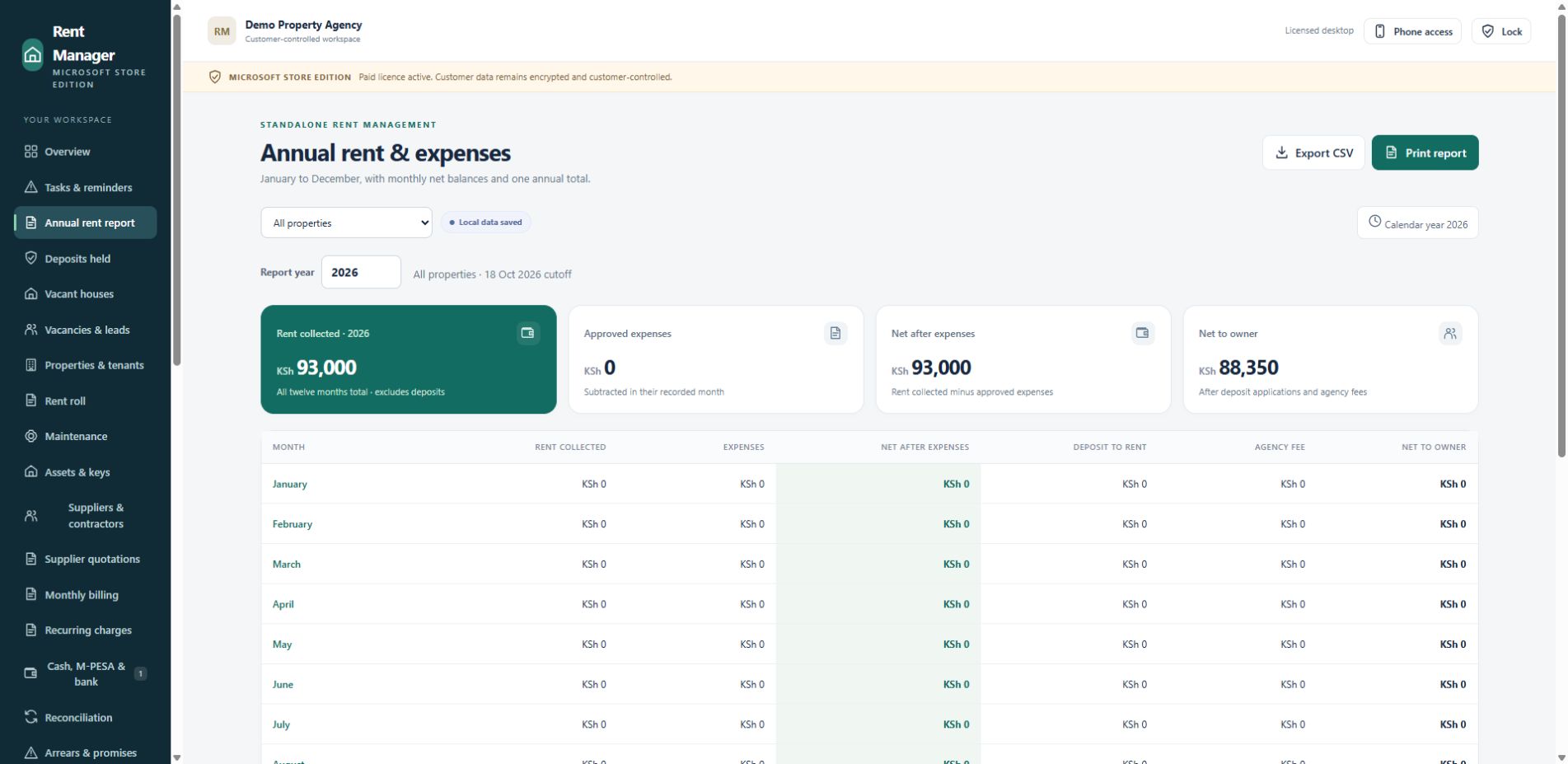
PROOF 3 · OWNER REPORT
Explain the month without rebuilding the story.
The annual report presents monthly collections, recorded expenses, deposit applications, agency fees and owner totals together.
Why that matters: your owner discussion can begin with the recorded transactions and report period, rather than a fresh calculation assembled from scattered files.
Visible here: KSh 93,000 collections and KSh 88,350 net to owner after the sample agency fee. Reports are management records, not certified tax statements.
WHY THIS CAN BE THE RIGHT CHOICE FOR YOUR RENTALS
Connected records, predictable software cost, control of your data.
Keep familiar payment methods
Your tenants can pay by cash, M-PESA or bank. You record those payments against the correct tenancy, without making a new tenant app the starting point for your records.
Automatic PayBill reconciliation requires separate customer-owned Daraja setup.
Continue local work offline
Once activated, the desktop app can work with local records without a constant internet connection. A dropped connection does not have to stop your record keeping.
First activation and connected services need internet.
Budget for software once
Lifetime activation costs KSh 4,999 in Kenya or US$49 for international users, for one active Windows installation/profile. There is no monthly or annual software renewal for the purchased desktop features.
Hosting, messaging, transaction costs and optional remote services are separate.
Your rental record stays under your control.
The Windows app uses a password-encrypted local workspace and lets you export encrypted backups to storage you choose. Tenant names, balances and rental backups are not uploaded to the publisher for licensing.
Build a sensible backup habit.
Keep a separate off-device backup and its password safe. For a computer change, restore the backup and arrange licence transfer support. An activation code cannot recover a forgotten backup password.
THE TOOLS BEHIND THE BENEFITS
Run the rental work from one workspace.
Properties, units & tenants
Keep tenancy references, rents, leases and occupancy organised. Separate former occupants from new tenants.
Rent bills & payment records
Generate monthly bills and record cash, M-PESA or bank payments. Review imported statement entries and unmatched money.
Arrears & follow-up
Review debt ageing and promises to pay. Use the recorded tenant balance when preparing follow-ups.
Receipts & statements
Review payment receipts, tenant statements and owner figures. Keep deposits distinct from rental income.
Maintenance & expenses
Track repairs, utilities, suppliers, quotations, assets and keys alongside property expenses and budgets.
Annual reports & exports
Review monthly collections, expenses and owner totals together. Export management records for your own review.
TRY THE PRODUCT BEFORE YOU DECIDE
Your own sample workspace. No sign-up.
Explore Rent Manager’s real interface and ledger calculations using fictional properties and tenants. Changes stay in browser memory and reset on reload.
Start with a KSh 4,000 sample payment
Choose Record payment → Green Court A02 · Brian K. Enter 4,000, confirm the sample details and save. Check his balance, then reset.
Website sandbox: no real payments, Windows vault, activation or live cloud connections. Use fictional entries only.
A PRACTICAL UPGRADE FROM SCATTERED RECORDS
Keep the payment and its context together.
| Everyday task | What Rent Manager brings together |
|---|---|
| A tenant pays in parts | Individual receipts and the remaining tenant balance |
| A reference is missing | An unmatched payment to review before allocation |
| An owner wants an update | Collections, recorded expenses and owner statements |
| Internet is unavailable | Local desktop work after activation |
| You replace a computer | Encrypted backup restoration and ownership-verified licence transfer support |
START WITH A WORKFLOW YOU UNDERSTAND
Download. Activate. Organise.
Explore and download
Try the website demo and watch the app video. Download Rent Manager from Microsoft Store.
Get lifetime activation
Confirm your purchase details and email. First activation needs internet; one active installation/profile is included.
Build your rental record
Add properties and tenants, record payments and review balances. Maintain a separate encrypted backup.
RENT MANAGER LIFETIME DESKTOP LICENCE
See the evidence. Try the workflow. Choose with confidence.
Kenya · KSh 4,999 once
International · US$49 once
One active Windows installation/profile. No monthly or annual software renewal. Separate from NyumbaLedger’s online subscription.
Choose your price above and continue to secure checkout. No enquiry or sales call required.
Free verified device transfers. Replacing your computer? Transfer your licence without buying again. Contact support from your purchase email with your order reference so we can verify ownership and release the old activation. One active Windows installation/profile at a time; restore your rental backup separately.
International customers: pay USD 49 by card. Choose USD 49 at checkout, then select card payment on Pesapal. After your payment is verified, your Rent Manager licence code and activation instructions are sent automatically to your email.
Download Rent Manager from Microsoft Store
Free Windows download. Lifetime activation is purchased separately above.
BUY WITH CLEAR EXPECTATIONS
Questions before you buy
Is the free download a free software licence?
No. Downloading Rent Manager is free. Paid activation is required to change rental records.
What does lifetime activation include?
No recurring software renewal for the purchased desktop features. Hosting, internet, messaging, M-PESA transaction charges and compatibility with every future platform are not included.
Does it connect to M-PESA or my bank automatically?
You can record M-PESA payments and import statements. Optional Safaricom Daraja PayBill reconciliation requires your own approved PayBill, credentials and callbacks. Bank records use manual entry or statement import; there is no included live bank feed.
Can I use my phone or sync to the cloud?
Optional cloud sync and scoped landlord/caretaker phone access require a separate customer-controlled Cloudflare deployment. Account setup, service costs and technical configuration are separate.
What if I change computers?
For a planned move, release the old installation while online, activate the replacement and restore your encrypted backup. For a lost computer, contact support from your purchase email for an ownership-verified licence transfer. An activation code cannot recover a forgotten backup password.
Does activation upload tenant records?
Tenant names, rent balances and rental backups are not uploaded to the publisher for licensing. Keep your backup password safe and maintain a separate backup.
Records use Kenyan shillings. Reports are management records, not statutory or tax certification. Review storage limits and portfolio capacity for a large business. Hosting, messaging, M-PESA transaction charges and optional integrations are separate.